


We are pleased to announce HELIO 26.2.0, our second feature release of 2026. This release lets you edit recipe parameters directly in the HMI with the new Parameter Table, plots multiple datasets on independent axes in 2D Plot, and turns Magic Output into a gateway to detail views — alongside a steadily growing SDK.
Download HELIO
Start Fresh
Upgrade
Follow the Upgrade HELIO guide.
Highlights
Recipe Editing – The Parameter Table
Editing recipes is one of the most role-dependent tasks in machine operation — a machine builder needs access to hundreds of parameters, an operator only to the few that matter. This release delivers the first part of getting that balance right.
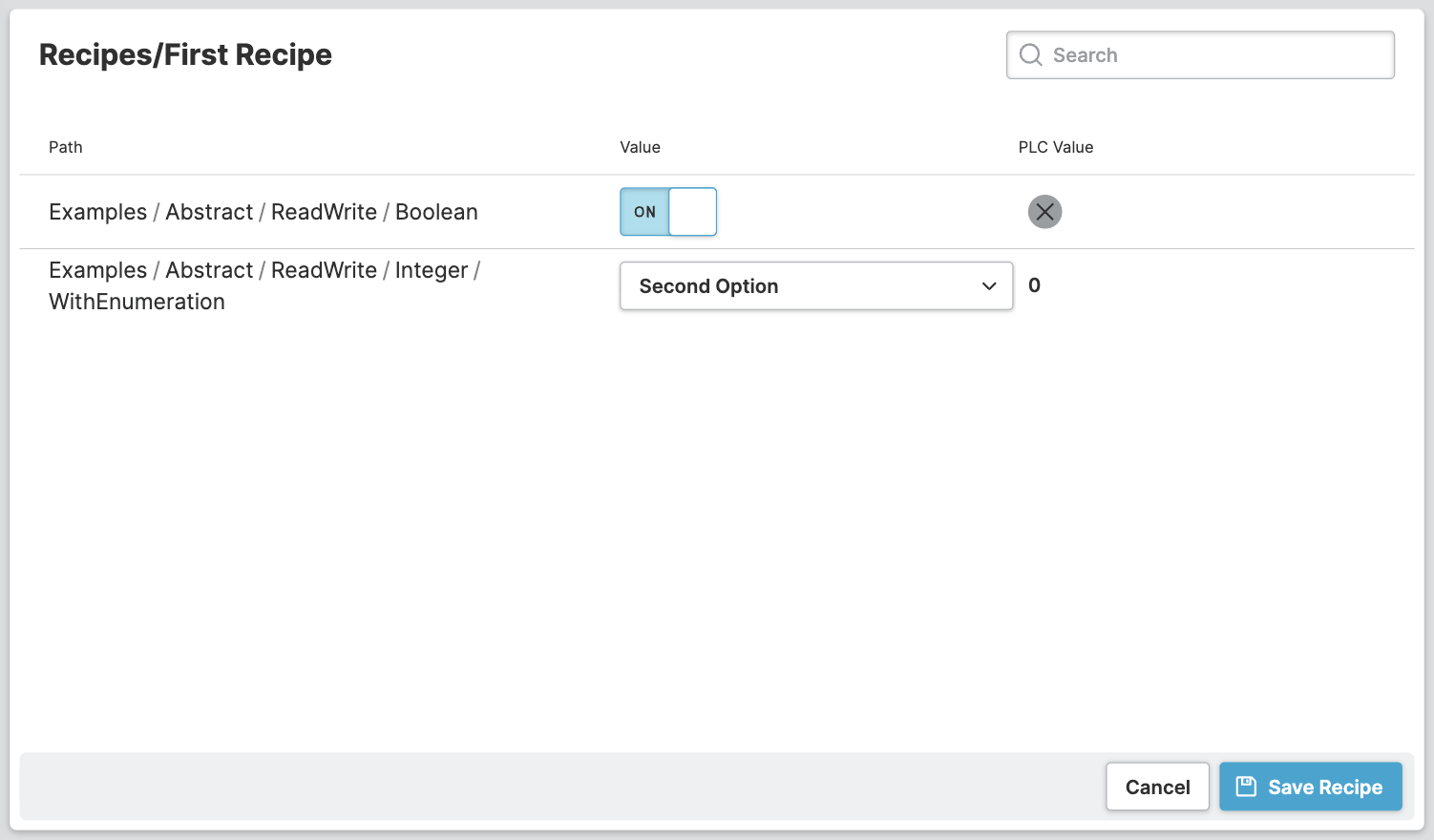
The new Parameter Table lets you edit recipe parameters directly in the HMI — a searchable, filterable list that scales to any parameter count. The current PLC value sits right next to the stored recipe value, so deviations are easy to spot.
Activating the feature in a role-based manner is a breeze using HELIO's powerful Dynamic Property system. For example, you could restrict access to it for specific groups using the Restrict To Users property type.
Learn more with the following resources:
2D Plot – Multiple Datasets, Independent Axes
The 2D Plot element can now plot several datasets at once, each with its own line thickness and color, to keep even dense charts readable at a glance.
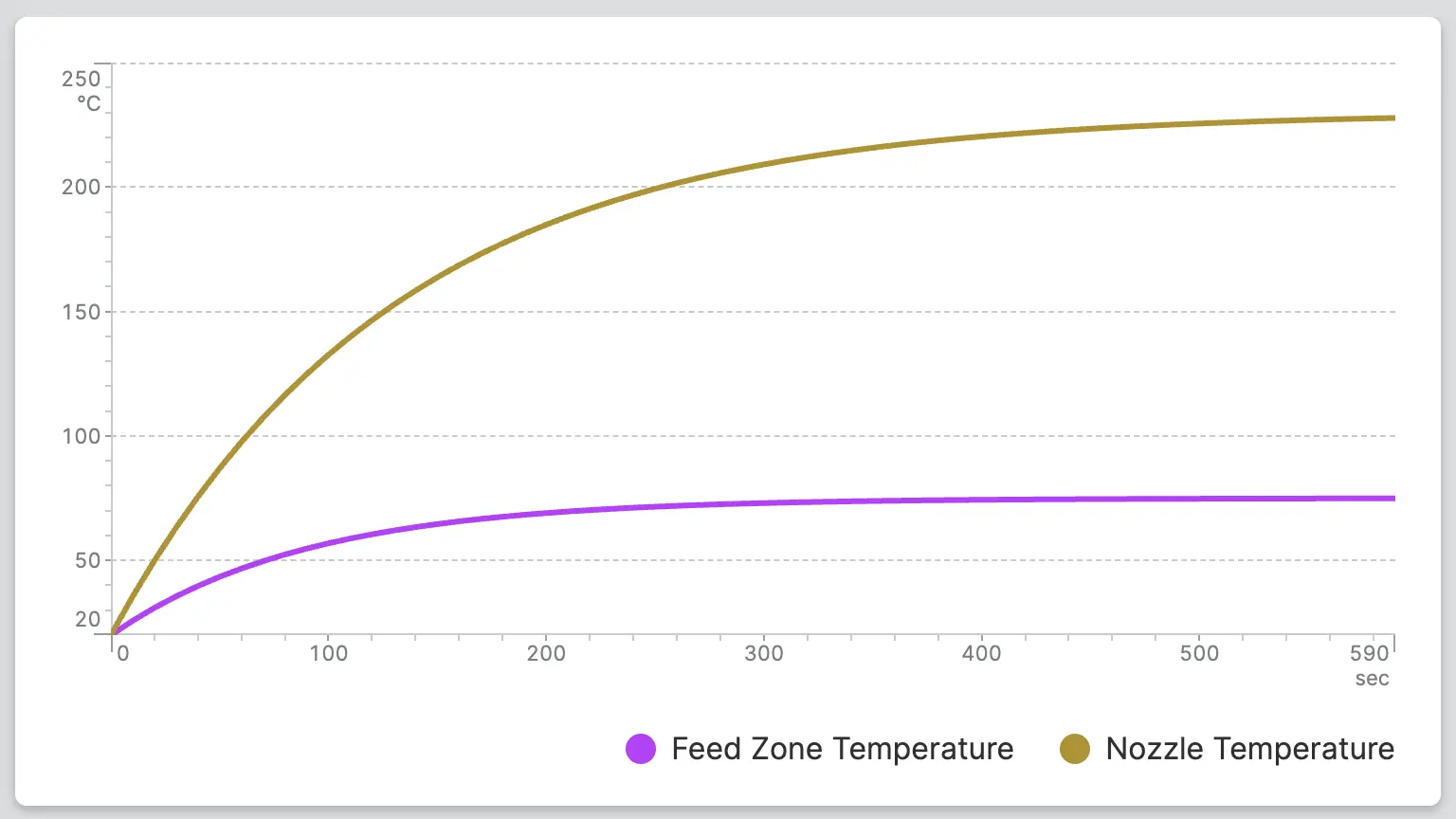
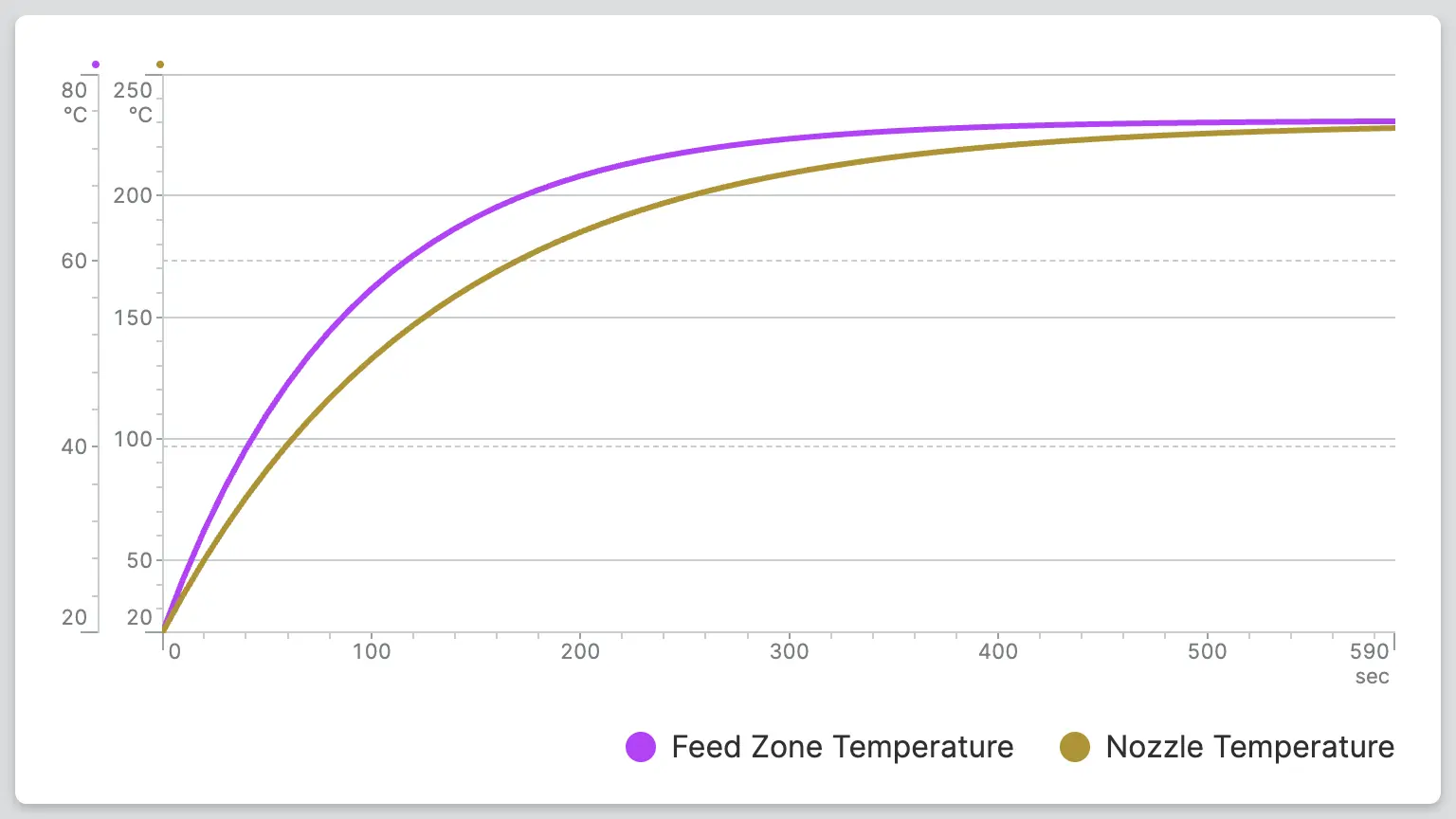
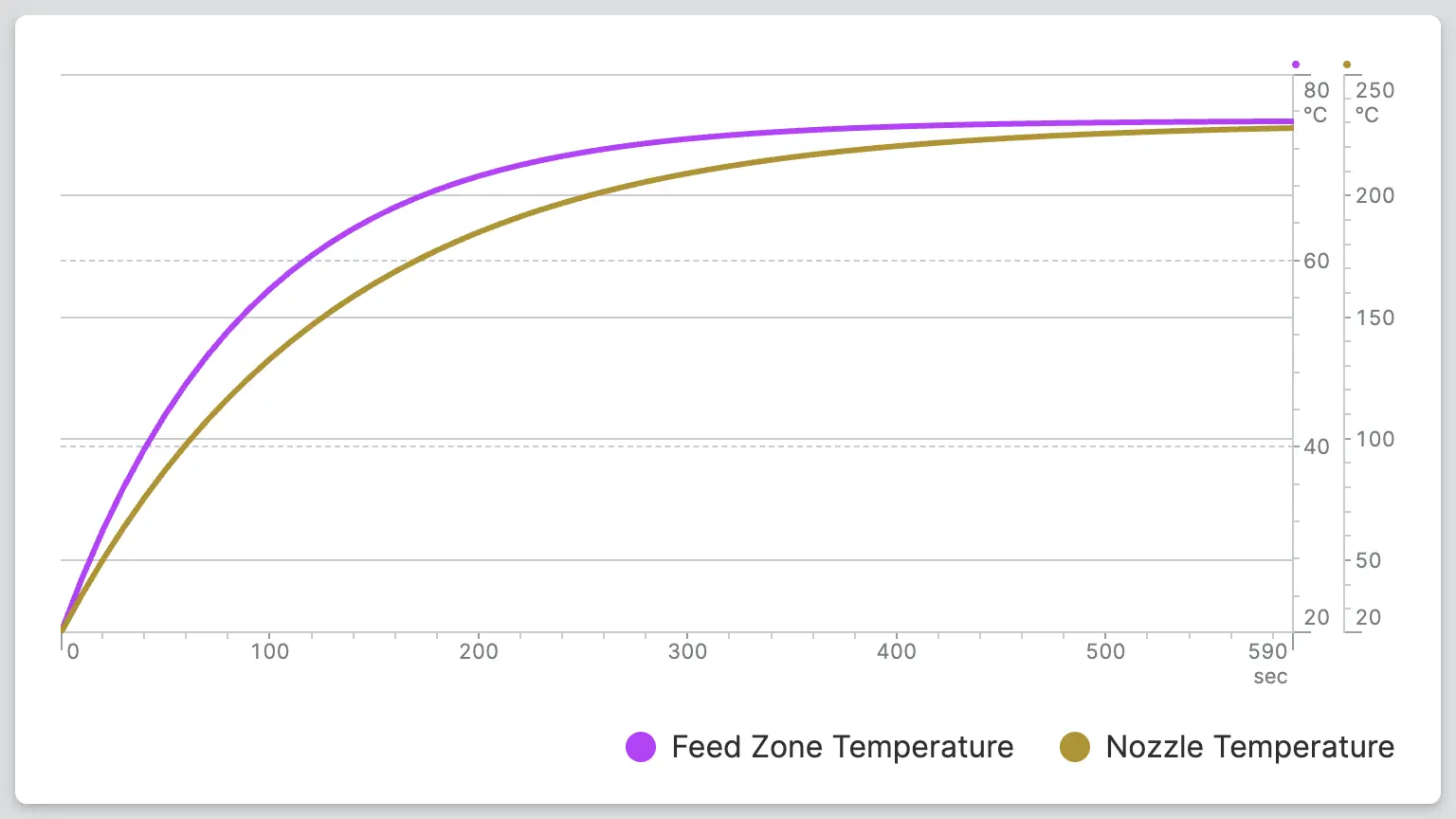
If two data sets use the same unit but cover different ranges of values,
displaying them on a single axis will cause one of the data sets to be
compressed into an unreadable narrow strip. Enable Display Axis Separately and
place each axis on its own side of the chart—left and right for the Y-axis, top
and bottom for the X-axis — so that each data set has a scale that corresponds to
its respective range of values.
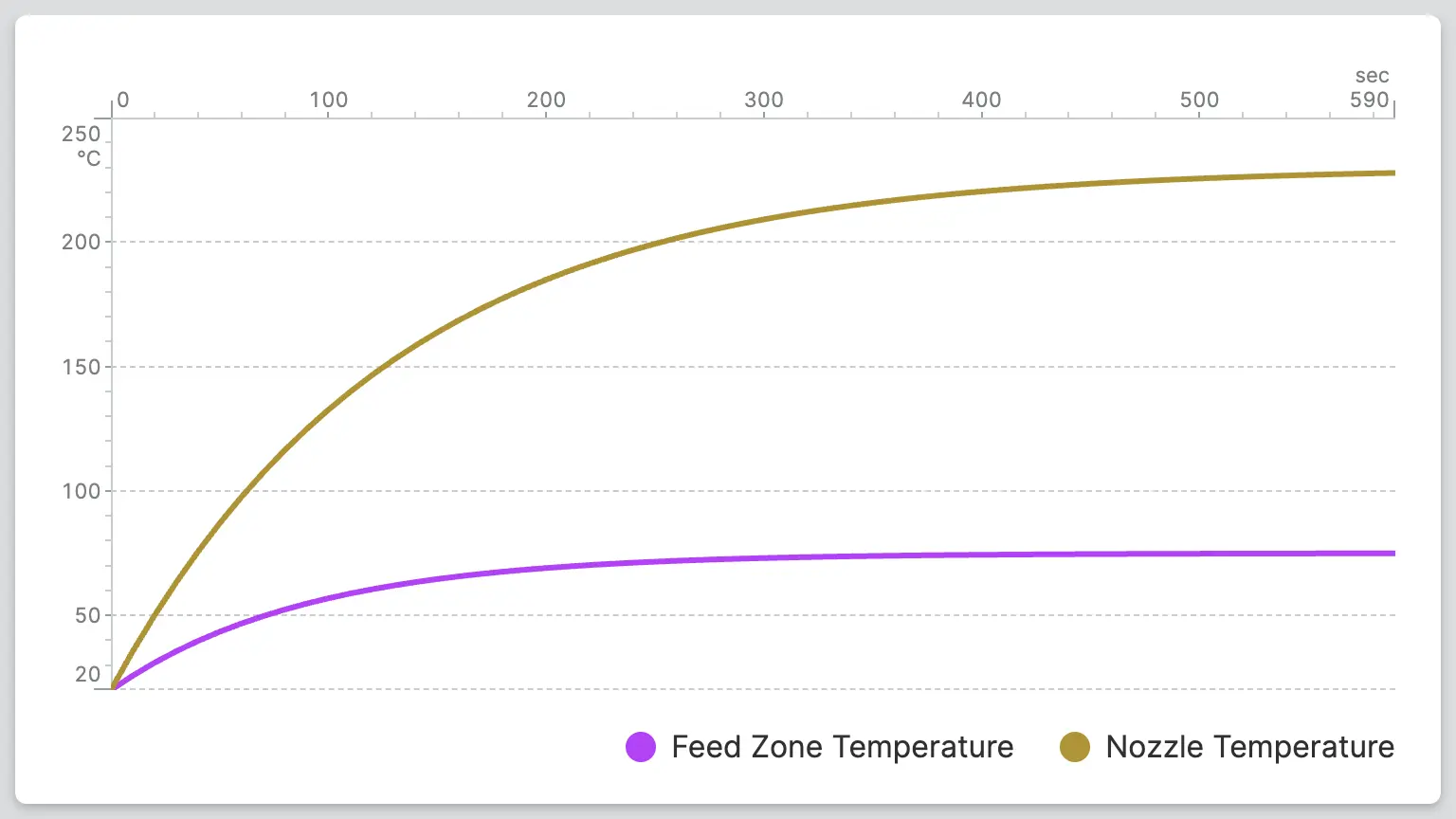
By the way: The same property, Line thickness, is now also available for the
Trend. Here’s to consistency!
Our Rulers Learned a New Trick – Use Your Fingers to Explore and Analyze Data
You can now easily read values from a Trend or a 2D Plot using the ruler—simply with your finger or a pointing device. On touchscreens, this means you can explore the data directly in the trend chart with your finger without having to tap it repeatedly—just explore naturally by pointing and dragging.
Magic Output – From Summary to Detail in One Click
The Magic Output now has an On click property, so a value that used to be purely for display can now be a gateway to much more.
Pair it with Open Page as Overlay Action to keep the surface simple — a status, a value at a glance — while a click drops the operator straight into a page with the full picture: history, related values, or even editing controls.
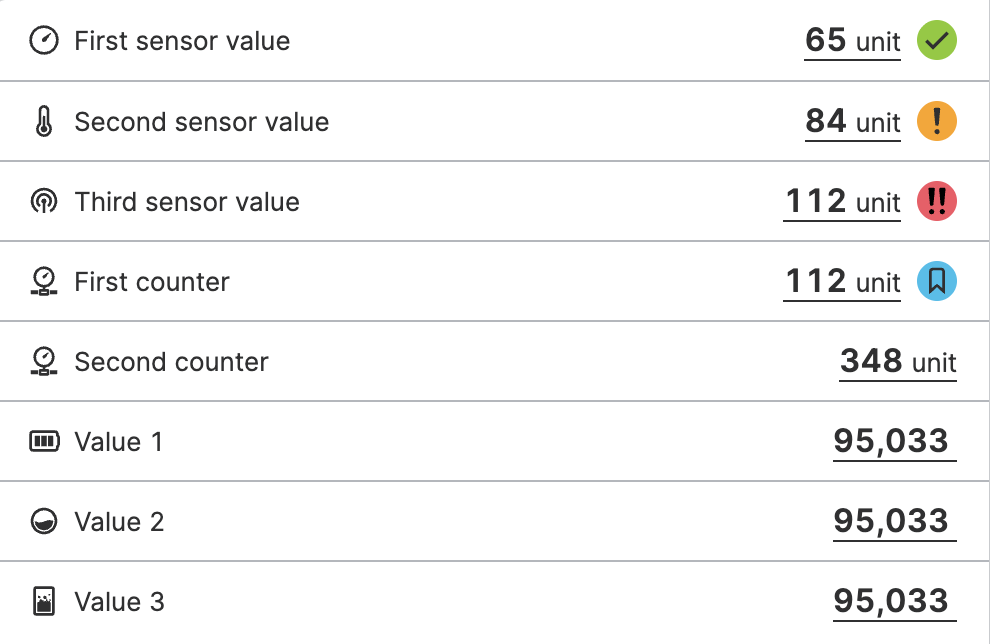
This can be handy inside a Data List, where every row is built from a Magic Output. Show a clean summary across many rows, and let each one open into its own detail view without cluttering the list itself.
SDK – More Capabilities, Shaped by You
The HELIO SDK keeps growing in exactly the direction our customers need it to. This release adds new building blocks for your Custom Elements, Custom Actions, and Custom Dynamic Properties.
Props Schemas allow extension developers
to just describe the properties of their custom elements and HELIO builds
a configuration UI automatically.
This release makes that description more capable and expressive with
structured Object and List property types, and richer Enum
options with icons and tooltips.


The List type isn't limited to simple values — list items can be objects
with their own properties. For example, define a list of Waypoints,
each with its own X and Y coordinates.
You can now model relationships between properties: show or hide one based on
another's value using visibleIf and enabledIf. Your extension's editor
adapts as users configure it, instead of showing every option all the time.
  maxVelocity: props.Number({
    ...
    optional: true,
    visibleIf: condition.propEquals("limitSpeed", true),
  }),
The new useDesignTokens hook gives you typed access to HELIO's theme
values, so you can style your own elements to match the current design
system instead of hardcoding colors or spacing.
function MyComponent() {
  const designTokens = useDesignTokens();

  return (
    <div
      style={{
        backgroundColor: designTokens.controlsPrimaryBackground,
        color: designTokens.controlsPrimaryText,
      }}
    >
      My Custom Control
    </div>
  );
}
Finally, we are making more elements from our design system available to
extension developers, e.g. Checkbox, Switch, Dropdown,
ButtonGroup, and RadioGroup components that pick up the style of your
current theme automatically.
Every addition traces back to a concrete request from a machine builder using our SDK in production. Expect the SDK to keep growing the same way: one real requirement at a time.
Changelog
New Features
Recipes
HELIO-7378 Added ability to edit parameters using the Parameter Table
HELIO-7372 Added ability to assign recipe codes
Messaging & Alarming
HELIO-6162 Added Archive Active Messages action to forcefully archive messages in case some messages get stuck
Design System
Elements
2D Plot
HELIO-7075 Added support for multiple data sets
Trend & 2D Plot
HELIO-7394 Added line thickness
HELIO-7299 Rulers now support dragging
HELIO-7598 Added On click property to Magic Output
Dynamic Properties
HELIO-7589 Added dynamic property Layout that allows you to dynamically define custom layouts, with an option to enforce them and disable HELIO's automatic responsive fallback
Data Layer
HELIO-6961 Added options for displaying numeric data variables with scientific or engineering notation
Improvements
Recipes
HELIO-7637 Added ability to add whole directories to a recipe type
HELIO-7668 All recipe-related actions and dynamic properties are now grouped in one single "Recipe" category
Design System
Container Elements
HELIO-6747 The "Main Action" is now supported uniformly for all elements that have a "Container". It has consequently been integrated into the "Container" settings and is now simply called "Action".
Dynamic Properties
HELIO-7114 Last Active Message Metadata: Added access to additional metadata records
IDE
HELIO-7212 Added warning in the URL target editor when adding a hash if the URL already contains one
HELIO-7728 Improved error reporting when saving the project fails
HELIO-6747 Outputs inside a data list can no longer declare actions that have no effect
HELIO-7165 Updated description of "UUID" dynamic property to mention that it is refreshed periodically
HELIO-7061 The dynamic properties "URL Parameter Value" and "Is URL Parameter Set" now only accept valid URL search parameter keys
HELIO-7727 SDK elements, actions, and dynamic properties are now categorized based on their extension's name by default
Data Layer
OPC UA Connection
HELIO-7806 Upgraded open62541 from 1.4.17 to 1.5.6
Fixed
Access Control
HELIO-7825 Prevented double submission on the User Management Page add user form
Recipes
HELIO-7592 Fixed bug where renaming a recipe would pre-fill the dialog with "-COPY" instead of the original name
HELIO-7645 Fixed bug where it was possible to have multiple recipe types with the same name
Exclusive Control
HELIO-7873 Fixed missing translation in Exclusive Control dialog
Design System
HELIO-7563 Fixed bug where the gauge pointer could display values out of range
HELIO-7563 Value and pointer of gauges and radial bars are now hidden when no value is available
HELIO-7154 Fixed Dashboard Widgets being cut off when both label and description are enabled
HELIO-7530 Fixed display conditions for listed pages in a Collection Page menu
HELIO-7817 Fixed Trend and 2D Plot ruler tooltips not respecting the number format
HMI
HELIO-7687 Fixed regression in Page Group where pages with "Hide page in Navigation" would not be displayed
HELIO-7638 Fixed bug where a Page Group nested in a Collection Page detail slot was not displayed
HELIO-7661 Fixed bug where requesting the index.html directly would not replace the base URL
HELIO-7330 Fixed and improved caching of the HELIO client application
HELIO-7545 Fixed Dashboard Page inside a Page Group flickering at certain zoom factors
HELIO-7665 Fixed bug in table sort where cycling through column sort order multiple times was not possible
IDE
Data View
HELIO-7339 Fixed issue where writing PLC variable values in the data tab was not possible in certain situations
HELIO-6911 Used consistent labels for variable data types in the PLC tree selection ("Date & Time" instead of "DateTime", "Translation Key with Values" instead of "IcuMessage", etc.)
HELIO-7696 Fixed data "Choose Data Record" dialog not filtering by type Array
Translations
HELIO-7195 Fixed imported translations not being displayed when no translation files existed before the import
HELIO-7283 Fixed file picker silently failing when importing files
HELIO-7242 Fixed bug where the visibility indicator would not correctly mark parameter pages
HELIO-7363 Fixed bug where it was possible to add the same extension multiple times
HELIO-7666 Fixed bug where filtering a large HMI tree was not working correctly
HELIO-7368 Fixed bug where renaming an instance in the HMI tree could unintentionally change the element's label
HELIO-7617 Fixed bug where the backend would crash on invalid PLC paths
HELIO-7855 Fixed SVG images with non-ASCII characters getting corrupted on import
HELIO-7655 Fixed bug that made it impossible to move an element with drag and drop to the last position
Data Layer
OPC UA Connection
HELIO-7577 Fixed crash for byte string NodeIds containing NUL bytes
HELIO-7602 Fixed panic on shutdown while trying to reconnect
HELIO-7414 Fixed bug where browsing the PLC tree could result in missing nodes
HELIO-7554 Fixed duplicate NotConnected errors after
connection loss
SDK
Added
props.Object: Added object prop typeprops.List: Added list prop typeprops.String: Addedmultilineoptionprops.Enum: Options can now specify custom labelsprops.Enum: Options can now specify an icon that is displayed in the editorprops.Enum: Options can now specify a tooltip that is displayed in the editorprops.Enum: Addededitoroption to choose between buttons and dropdown displayprops.Enum: Option values are now typed more strictlyprops.Number: Addedunitoption to display a unit suffix in the editorprops.DynamicProperty:valueTypenow also accepts a list of value types- Most props now accept
visibleIfandenabledIfoptions to hide or disable a prop in the editor based on a sibling prop's value - Added
conditionhelpers (propEquals,propNotEquals,propOneOf,propNotOneOf) for declaringvisibleIfandenabledIfconditions props.String,props.Number,props.Boolean,props.Enum,props.DynamicProperty,props.Action,props.File: Added optionaldescriptionfield to display a description below the property in the editorcreateAction,createDynamicProperty: Added optionaltextspropertyprops.Number: AddedminValueandmaxValueoptions- Added
Checkboxcomponent - Added
Switchcomponent - Added
Dropdowncomponent - Added
useDesignTokenshook - Added
ButtonGroupcomponent - Added
RadioGroupcomponent Button,Checkbox,Switch,NumberInput,TextInput: AddedariaLabelprop to provide an accessible name for screen readers
Changed
createElement: Madedescriptionoptional.
Fixed
props.Enum: Fixed incorrect type on optional props
Early Access
The following features are available in early access. They are functional but not yet fully documented, and may change in future releases. If you have interest in one of these features, get in touch with us.
Elements
HELIO-7119 Added "Presence Signal" property
Structs
HELIO-7566 Added basic reading and writing of Struct variables via "Data Variable" property
HELIO-7635 Added Struct support to the "Write Data Variable" action
Actions
HELIO-7421 Actions in "Execute Multiple Actions" can now be marked as optional
API
HELIO-7376 Restructured the API's routes for clearer naming and long-term consistency — based on customer feedback and additional use cases
Icons
31 icons have been added to the HELIO Icon Set, bringing the total to 1348.
Added
BarsGraphHorizontalCameraSlashChartRadarChartUserFishBonesGrapesLaptopSmartphoneMushroomPyramidChartSandwichScatterBubbleSequenceStepsSieveSteppedDownSteppedLeftSteppedRightSteppedUpStrawberryTrendUpDownVacuumSealedVerticalBarWashingHandWaterfallZigzagDownZigzagLeftDownZigzagLeftZigzagLeftUpZigzagRightDownZigzagRightZigzagRightUpZigzagUp