Last Active Message Metadata
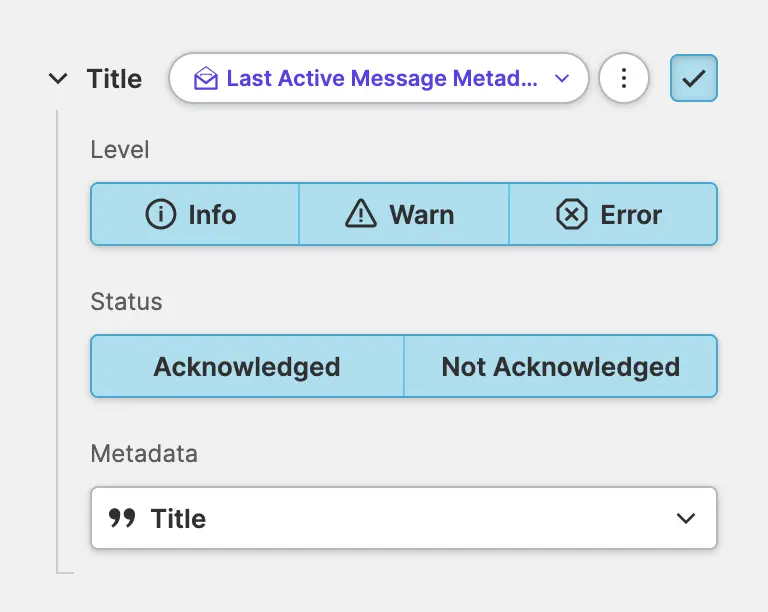
Use this property to display metadata such as code, level, title, and description of the last active message anywhere in your HMI. Set filters for the level and status of the message and select the metadata you need.
Level
Select the message levels to include. HELIO will display the last active message that has one of the selected levels. You can also select more than one level.
Status
Select whether acknowledged or unacknowledged messages should be included. You can also select both options to display all messages.
Metadata
Select the metadata property that you would like to display.
Id
This is an internal unique id HELIO uses to identify each message within its Message Store.
Code
Code that identifies the type of message. See Messaging Basics: Storage, Codes and Levels for more details on this topic.
Level
Identifies importance of the message. Possible values are Info, Warn and Error.
See Messaging Basics: Storage, Codes and Levels for more details
on this topic.
Title, Description, and Solution
The actual content of the message which gets configured using the Message Types View.
Message arrival date
Time at which the originating Message Trigger became true and HELIO added
the message to its Active Messages collection.
Message acknowledged date
Time at which the message was acknowledged by an operator.
Can acknowledge message?
Boolean flag that indicates if the message can be acknowledged.
Please note that this is a Deprecated: Messaging v1 feature.
Message was acknowledged?
Boolean flag that indicates whether the message was confirmed by an operator.
Acknowledger
Username of the operator who acknowledged the message.
Additional Record
New This Feature Was Added In HELIO 26.2.0
Access the value of an additional record that has been attached to the Message or the Message Trigger.
Enter the the name of the record you want to access.
Additional records can be attached by a Message Trigger using
the Additional Variable Record properties
or to the Message itself using Additional Static Record properties.