


We are excited to announce HELIO 26.1.1, our first feature release of 2026. This release brings significant data visualization upgrades — a new 2D Plot element and a redesigned Gauge & Radial Bars — alongside Vendor Users and the first public preview of the HELIO HTTP API.
Download HELIO
Start Fresh
Upgrade
Follow the Upgrade HELIO guide.
Highlights
Data Visualization: 2D Plot – Visualize the Relationship Between Two Datasets
The new 2D Plot element visualizes the relationship between two datasets by plotting one array against another on a two-dimensional chart. Each axis can be connected to a live array variable from the PLC — perfect for real-time sensor profiles, quality curves, and calibration data.
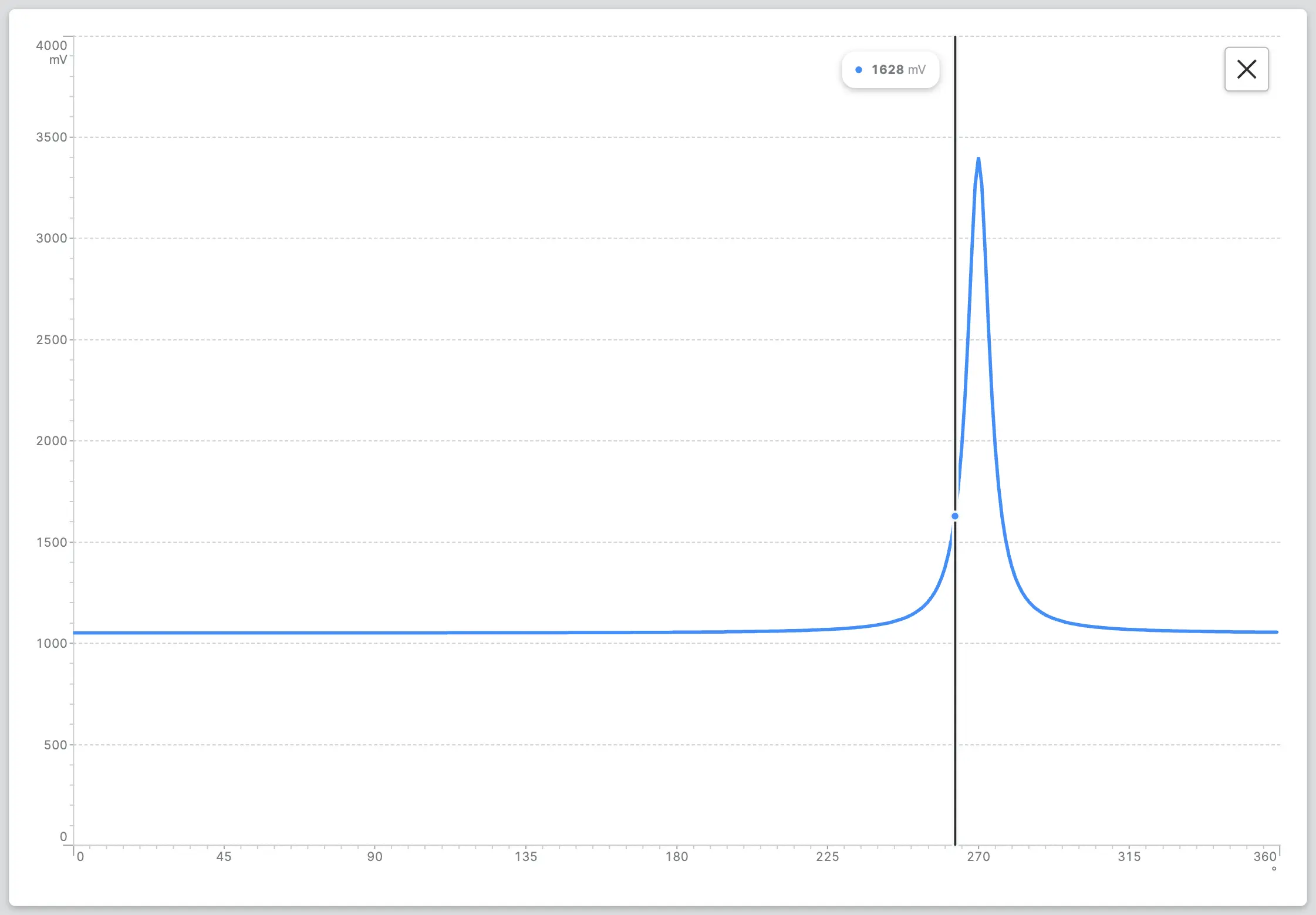
Not everything needs to be live. Each axis also supports static data sources: use the brand new Dynamic Property called Sequence to generate an evenly spaced range for either axis.
Gauge & Radial Bars – Sharper, More Configurable, and Design System-Ready
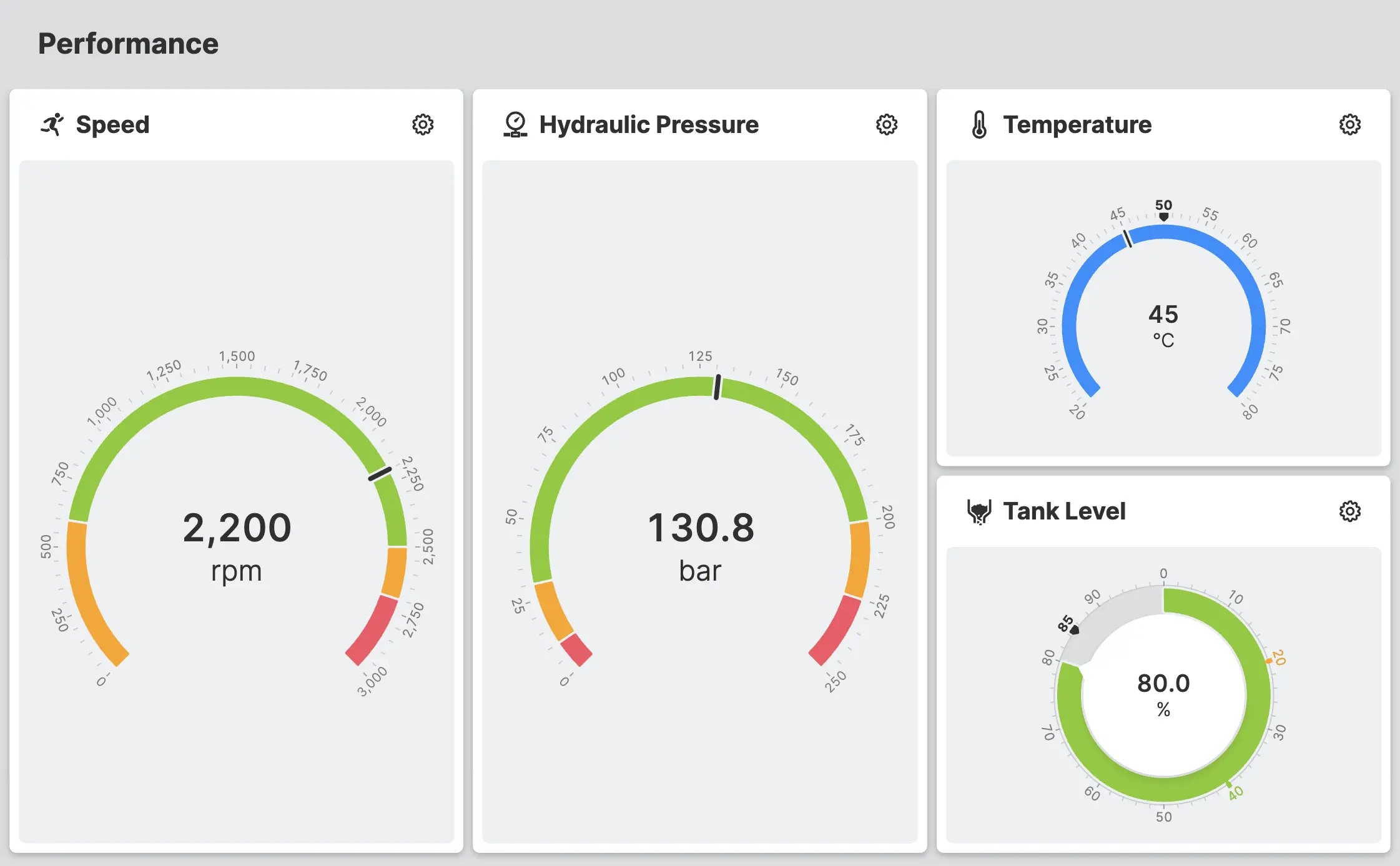
The Gauge and Radial Bars elements have received a major set of improvements in 26.1. Responsive behavior inconsistencies have been resolved, making both elements even more reliable across different screen sizes and layouts.
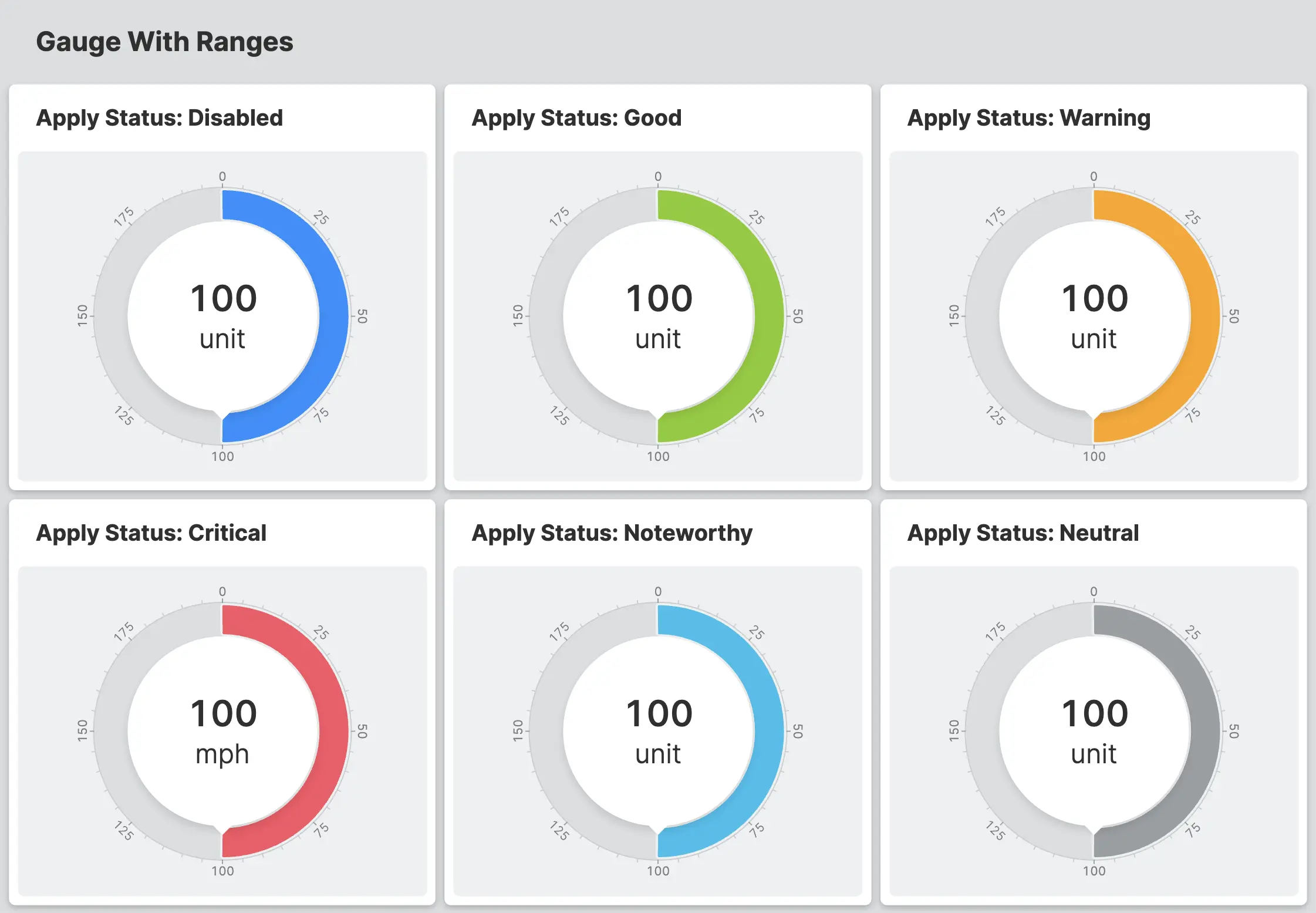
On the configuration side, you can now apply a manual status to override the automatically calculated one — useful when process logic needs to force a warning or critical state regardless of the measured value.
The new Ticks sections gives you fine grained control over tick display:
Finally, both elements are now tightly integrated with the HELIO Design System and its theming capabilities – allowing our designers to tailor every visual detail even more easily to your brand.
Vendor Users
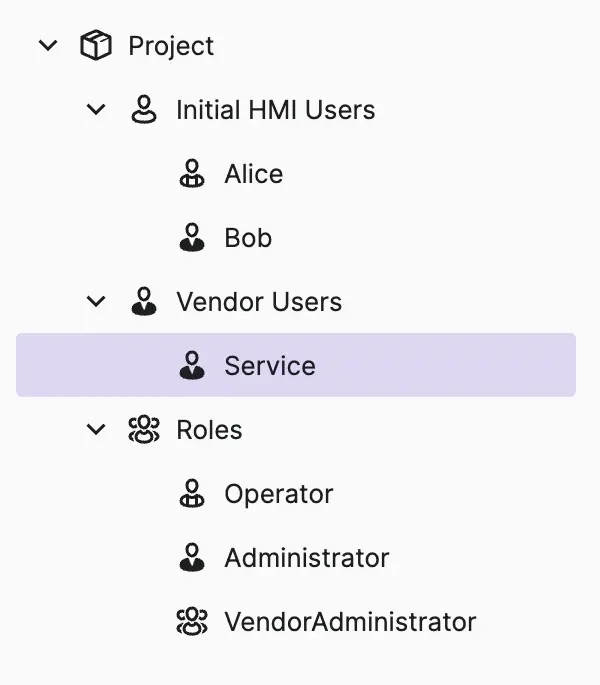
Machine vendors can now embed dedicated service accounts directly into a HELIO project. Vendor Users & Roles never appear in the HMI's user management — customer administrators simply cannot see or modify them, giving your service team a reliable entry point on every deployed machine.
Project Import – Drag, Drop, Done
Importing a project into the HELIO IDE has never been easier. Simply drag and
drop a .helio file anywhere onto the Home Page — it
appears highlighted in your project list, ready to open.
Early Access: The HELIO HTTP API – Built to Extend
The complexity of modern HMIs constantly challenges us to view extensibility as a fundamental building block. Until now, developing and operating HMIs with HELIO required manual engineering via the HELIO IDE. With the new HELIO HTTP API, we are opening HELIO up to the world beyond the manual user interface. Scripts, applications, and AI agents can now communicate directly with HELIO, opening up workflows that go beyond what the user interface alone can do.
The HELIO SDK lets you extend HELIO from within a project. The new HTTP API lets you safely reach into HELIO from the outside — from any tool, any language, or system.
We are confident that this reliable API will make HELIO even more useful for product teams by enabling extensibility and automation. Just like the HELIO SDK, we designed it so that you can extend HELIO with confidence.
For example, it follows the OpenAPI specification, making it self-explanatory and easy to access from any language or stack. This clear and structured system boundary between HELIO and other systems allows you to build sustainable, long-lasting integrations and tools on top of it.
First Stop: User Management API
The first capability of the API in this early-access version is HMI user management. For example, machine builders can empower their customers to flexibly manage user roles and access rights by creating import scripts for custom, customer-specific access management file formats.
As an early access feature, the API is actively taking shape — we're refining it based on real-world usage, meaning that breaking changes in this phase are expected. As with the SDK, we are developing this feature in close collaboration with our customers, to lay a solid foundation for the years to come.
If you have a concrete use case for the HELIO HTTP API or would like to explore it early, reach out to our team to request access.
Changelog
New Features
Access Control
Design System
HELIO-6305 Added 2D Plot element
Dynamic Properties
HELIO-6360 Added Sequence
IDE
HELIO-6311 Authentication & Security Settings: Added "On Sign in > On Success" to execute an action after a user signs in successfully, for example to request exclusive control
HELIO-6601 Import a Project: Import .helio project files by dragging them anywhere onto the home page
HELIO-6670 Ensured that Placeholder & Auto Reset values take min/max values into account
HELIO-6720 Added automatic translation generation for Component Property Enums
Data Layer
OPC UA Connection
HELIO-6954 Added Excluded Namespace URIs option to the Browsing settings. The OPC UA DI namespace is now excluded by default, as it can introduce duplicate nodes in the address space tree on some PLCs. See OPC UA Connection for details.
HELIO-6692 Added support for reading/writing arrays of SIMATIC date/time/duration types
Runtime
HELIO-6440 Command Line Parameters:
The --appdata and --appdata-unversioned parameters have been introduced.
Consequently, the --config parameter has been marked as deprecated.
Improvements
Recipes
HELIO-6303 Added a Loading disabled when condition to the
settings of a recipe type — use it to prevent recipes from being loaded while
the PLC is in a state where doing so would cause trouble
HELIO-6512 Fallback values can now be defined for recipe parameters, allowing incomplete recipes to be loaded
HELIO-1849 A toast now confirms when a recipe has been loaded successfully
HELIO-1792 Added Dynamic Property Is Active Recipe Set to check if a recipe group has a currently active recipe
HELIO-1792 Active Recipe Metadata now inherits the recipe group if it is used within a Recipe Management Page
HELIO-6652 HELIO now prevents the same data variable from being used in multiple recipes
HELIO-6117 Deleting an inactive recipe no longer sets the active recipe to inactive
HELIO-6687 Export Recipes Action: CSV column headers now include the PLC variable node address — making the exported file easier to understand, reuse, and re-import correctly
HELIO-6530 Improved error reporting when importing and loading recipes
Messaging & Alarming
HELIO-6371 Messaging Settings: Updated "Archive Message When" — choose when messages are moved from the active list to the archive
HELIO-7076 Active Message Metadata: Added access to additional message records
HELIO-6523 Removed legacy "Messages" slot from projects using Messaging v2
Design System
Gauge & Radial Bars
HELIO-6131 Gauge and Radial Bars have been revamped to be fully customizable to match your brand
HELIO-6131 Added the ability to control ticks
HELIO-6184 Added the ability to apply a manual status
HELIO-6742 Harmonized formatting of scale labels across visualization elements
Trend
HELIO-6133 Trend lines can now be toggled by clicking their label
Dropdown (from List)
HELIO-6242 Added ability to disable the element
On-Screen Keyboard
HELIO-6157 Has been revamped to be fully customizable to match your brand
HELIO-7078 Made header cells in status bar clickable
Dynamic Properties
Calculate
HELIO-2036 Added ability to define fallback value when the calculation results in an error
HELIO-1931 Method Output Argument: Renamed from "Method Output Parameter" to align with the terminology used in the Data View
HMI
HELIO-6091 Open overlays no longer block the Main Navigation — navigating to another page via the Main Navigation or a "Navigate To Page" action now automatically closes them
HELIO-6312 Automatically release exclusive control when a user signs out
HELIO-5954 The project URLs have been restructured to pave
the way for more powerful URL-based features. HMIs are now accessible at
/project/<project>/run instead of /runtime/<project>. Existing
bookmarks and links redirect automatically.
IDE
HELIO-6383 Cleaning up the translations no longer takes built-in templates into account
HELIO-6694 Context menus are now cleaner: icons removed, row height reduced, and entry order further standardized
Project Templates
HELIO-6939 Renamed the Playground PLC connection to "HELIO Playground PLC" to avoid naming conflicts with OPC UA connections in your own projects
Data Layer
OPC UA Connection
HELIO-6987 Reduced overall latency for reading PLC variables when opening HMI views with many parameter values
HELIO-6535 Reduced the number of subscribed variable values in filtered lists
NOA Connection
HELIO-6049 Refreshing the node tree no longer requires reconnecting — updates are faster and the active connection is not interrupted
HELIO-6773 Allow history only for numeric values and booleans
Runtime
HELIO-6544 Moved machine license files from root into the slots of the HELIO Data Directory
Fixed
Recipes
HELIO-1987 Fixed a bug where deleting a recipe from an overlay would redirect you to the recipe management page
Design System
HELIO-1662 Tab Group: Pages hidden via the Display Condition are now also hidden — previously Tab Groups ignored this setting
HELIO-6555 Fixed formatting of numeric values on Value Bar scale display
HELIO-6663 Fixed Trend in Parameter Page Side Panels having a wrong size after layout shift
HELIO-2022 Fixed overflowing text in Data List
HELIO-6122 Fixed inconsistencies in responsive behavior of Gauge and Radial Bar elements
HELIO-2051 Fixed Axis Control element displaying the fallback button when there is still enough space available
HELIO-6491 Dashboard Widget: Fixed bug in Custom Layout that would place elements in the wrong order when there were 10 or more elements
HELIO-6437 Fixed issue that caused Dashboard Widgets being created with an empty icon for the Main Action
HELIO-6462 Improved header cell sizing logic — cells no longer overflow or collapse to icon when sufficient space is available
HELIO-7174 Magic Input: Fixed a bug that caused zeros to be removed when entering numbers in certain locales (bg-BG, es-ES, hu-HU, it-IT, lv-LV, pl-PL, pt-PT, sl-SI)
Dynamic Properties
HELIO-6372 Fixed usage of "Exclusive Control" as Expression in Dynamic Property "Switch"
HELIO-7111 Fixed dynamic property "Method Output Argument" not working in "Open Page as Overlay" action
Actions
HELIO-6920 Fixed bug where a Switch action did not react to expression changes at runtime, which could cause the wrong case to be selected
HMI
HELIO-6695 Fixed missing notification about pending changes when leaving pages in overlays
HELIO-6403 Fixed unintended closing of dialogs when toggling overlays
HELIO-6088 Fixed OSK not closing when navigating to different page
HELIO-1516 Fixed inconsistencies in Main Navigation
HELIO-6129 Fixed issue where SVG contents could not be
displayed if <defs>-elements were appended to SVG file
HELIO-6805 Data Collection: Fixed writing the value of newly added attributes without an existing attribute value
HELIO-6886 Fixed possible HMI crash when adding a new language
HELIO-7025 PLC-driven dialogs now appear reliably and without noticeable delay
HELIO-6861 Fixed issue where the current theme and zoom settings were applied to all projects
HELIO-7068 Fixed HMI crash triggered by using a display condition on a video element
IDE
Data View
HELIO-6690 Fixed issue where dragging PLC nodes into the
HMI tree would not sanitize special characters [, ], /, ., *,
? until saving the project
HELIO-6556 Fixed issue where view could become unresponsive when importing connection data
HELIO-6733 Fixed bug that could lead to incomplete data when dragging PLC nodes with too many children to the HMI tree
HELIO-6711 Fixed bug where editing a component property could result in an incorrect state if another component property had been deleted beforehand
HELIO-6192 Improved error reporting when using the file picker
HELIO-6210 Fixed issue where deleting the first message trigger would select the last item in the list
HELIO-6316 Fixed scrollbars not showing correctly when resizing Messages Editor
HELIO-6325 Fixed issues where scrollbars were hard to use next to resizable panels
HELIO-6902 Fixed "Unsaved Changes" dialog not appearing after browser navigation
HELIO-6996 Fixed page selector when referencing pages with empty titles
HELIO-7110 Fixed custom themes not being applied reliably after project open or theme import
Data Layer
HELIO-6649 Added missing coercion to PLC data type when writing variable values
HELIO-6531 Improved history database cleanup for projects not currently displayed in the HMI
OPC UA Connection
HELIO-6308 Further hardened connection shutdown to prevent timeouts when connections are in a disconnected state
HELIO-6827 Improved cache refresh after connection recovery
HELIO-6842 Improved handling of and recovery from connection loss
SDK
HELIO-6651 Fixed possible empty property group on SDK elements
HELIO-6600 Fixed a bug that could cause the HMI to crash when updating an extension with a prop migration
HELIO-6340 Fixed SDK NumberInput and TextInput not
triggering the on-screen keyboard on touch devices
Early Access
The following features are available in early access in HELIO 26.1.1. They are functional but not yet fully documented, and may change in future releases.
HELIO HTTP API
HELIO-5985 The HELIO HTTP API is available in early access. See the highlight above for details.
HELIO-5994 Added ability to register API apps in IDE Authentication
Message List Triggers
HELIO-6912 Fixed filter for Message List Triggers
Icons
138 icons have been added to the HELIO Icon Set, bringing the total to a
whopping 1317. 🎉
Added
AlarmExclamationAlarmMinusAlarmPlusAlarmSnoozeAlienAstronautAudioAutomaticModeBacteriumBagelBiohazardBlobShapeBombBottomBarBroomCactusCalibrationChainsawChefsHatChessKnightChristmasTreeCleaningSprayCloverleafShapeColdCutsConveyorGripperCowCrabCroissantDollopShapeDotColumnsDotRowsDoubleHorizontalLineDoubleVerticalLineElevatorEllipseEscalatorDownLeftEscalatorDownRightEscalatorPersonDownEscalatorPersonUpEscalatorUpLeftEscalatorUpRightFallingEdgeFaucetDripFaucetFeatherDusterFishFolderBookmarkFolderCheckFolderDownloadFolderSearchFolderUploadFolderUserFooterInsertFourFingersGhostGiftGrainAwnGrainEarGreaterEqualGreaterGroupContainerHandheldScannerHeaderInsertHorizontalSplitInclinedConveyorDownInclinedConveyorUpKiteLayerMinusLayerPlusNumber0NumberCircle0NumberSquare0OctopusOptimumOrientationEastOrientationNorthEastOrientationNorthOrientationNorthWestOrientationSouthEastOrientationSouthOrientationSouthWestOrientationWestParallelogramPeakPlantSproutQuatrefoilRIFDRampDownRampUpRisingEdgeRotateDashedCCWRotateDashedCWSideTrackLeftDownSideTrackLeftUpSimulationModeSmallerEqualSmallerSmileyAngrySmileyDizzySmileyGrinSmileyNeutralSmokeSmolderSnowmanSparePartsSpeechBubblesCheckSpeechBubblesExclamationSwirlSynchronizeDataSyringeTablewareTelescopeTemperatureColdTemperatureHotTemperatureSlashTemperatureWaterThreeFingersThreeRowsTobogganTopBarTornadoTransportScrewLeftTransportScrewRightTrapeziumTrashbinUndoTwoFingersUfoBeamUfoUnequalsUniversalAccessUserAddUserDeleteUserEditUserLockedUserSecureVaporWaterDropJellyfish