


We are excited to announce that HELIO 25.4.0, our fourth and last feature release of 2025, is now officially available to everyone. This release lets you extend HELIO with confidence with the public release of the new HELIO SDK.
Download HELIO
Start Fresh
Upgrade
Follow the Upgrade HELIO guide.
Highlights
The HELIO SDK – Extend With Confidence
This has been our most requested feature for a while, and we are excited about how it turned out. With the HELIO SDK you can now extend the core functionality and create new controls, widgets or entire page types that integrate fully with our easy-to-use editor and responsive renderer.
Use the HELIO Design System for the common ground, and add custom components for what makes your machine unique.
Here's just one example: a Circular Flow element which was built entirely with
the SDK. Each section is a custom element you can configure, add click actions
to, and mark as completed or active.
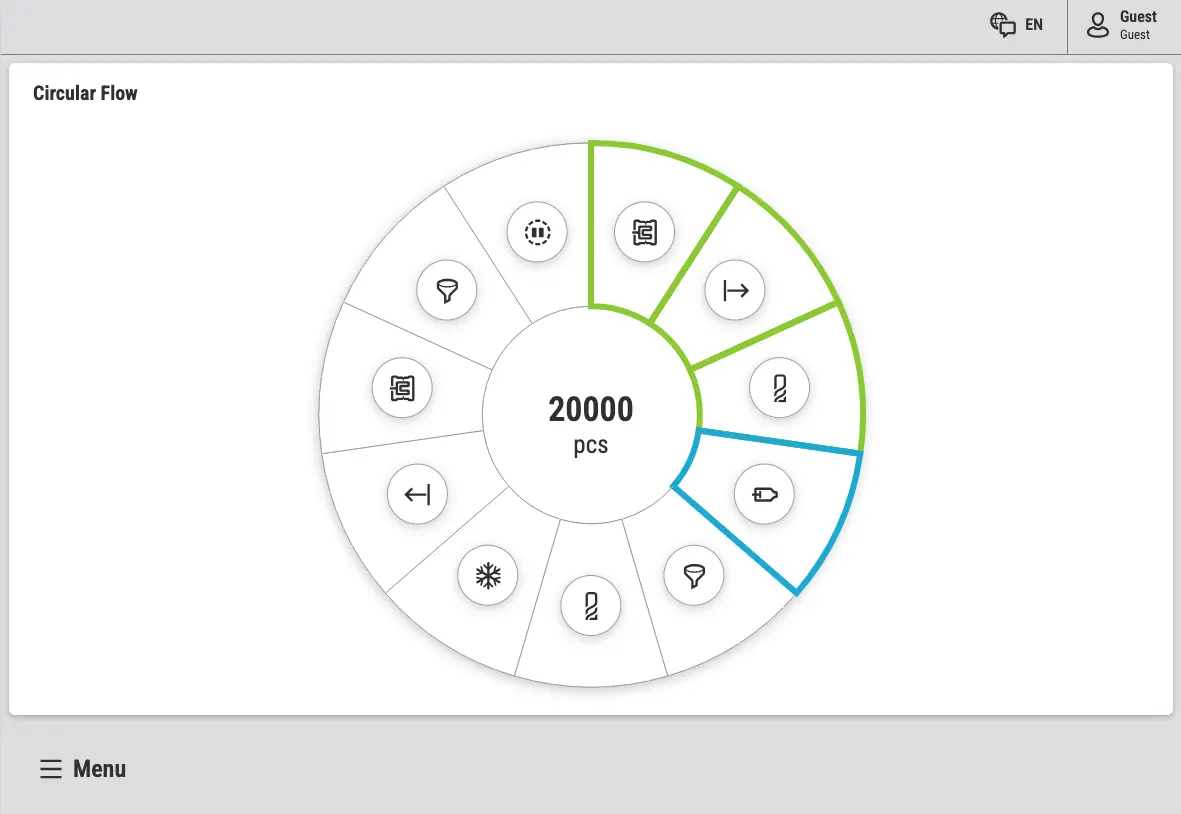
Perfect for guiding operators through multi-step processes or maintenance workflows – and it integrated seamlessly with HELIO's existing building blocks such as Actions and Dynamic Properties.
Built To Empower Cross-Functional Product Teams
Just like OPC UA creates a clean boundary between your PLC logic and your HMI, the SDK creates a clean boundary between HELIO's core and your custom extensions.
This matters for how your product team works. Your PLC engineers focus on control logic. Your HMI engineers focus on the visual interface using HELIO's no-code editor. And now, your web developers can build specialized components when needed – without stepping on each other's toes. Clear boundaries. Clear APIs. Everyone focused on what they do best.
Learn more with the following resources:
IDE Refresh – Creating Room to Grow
After extensive conversations with our customers and comprehensive UX testing with real users, we've given the HELIO IDE a major refresh. But this isn't about making things look pretty – it's about removing friction from your daily work.
Room to Grow
This redesign
creates space for the features we have planned. Future enhancements will
integrate seamlessly into this refined workspace instead of adding
complexity.
Faster HMI Engineering
We've reimagined the layout to put the tools you need most within easy reach.
Less clutter. Better navigation. Faster access to what matters.
The IDE works better today and is ready to evolve with your needs for years to come.
A Refreshed Home Page
We've aligned the Home Page of the IDE with the layout of
Project Editor giving you a more consistent behavior.
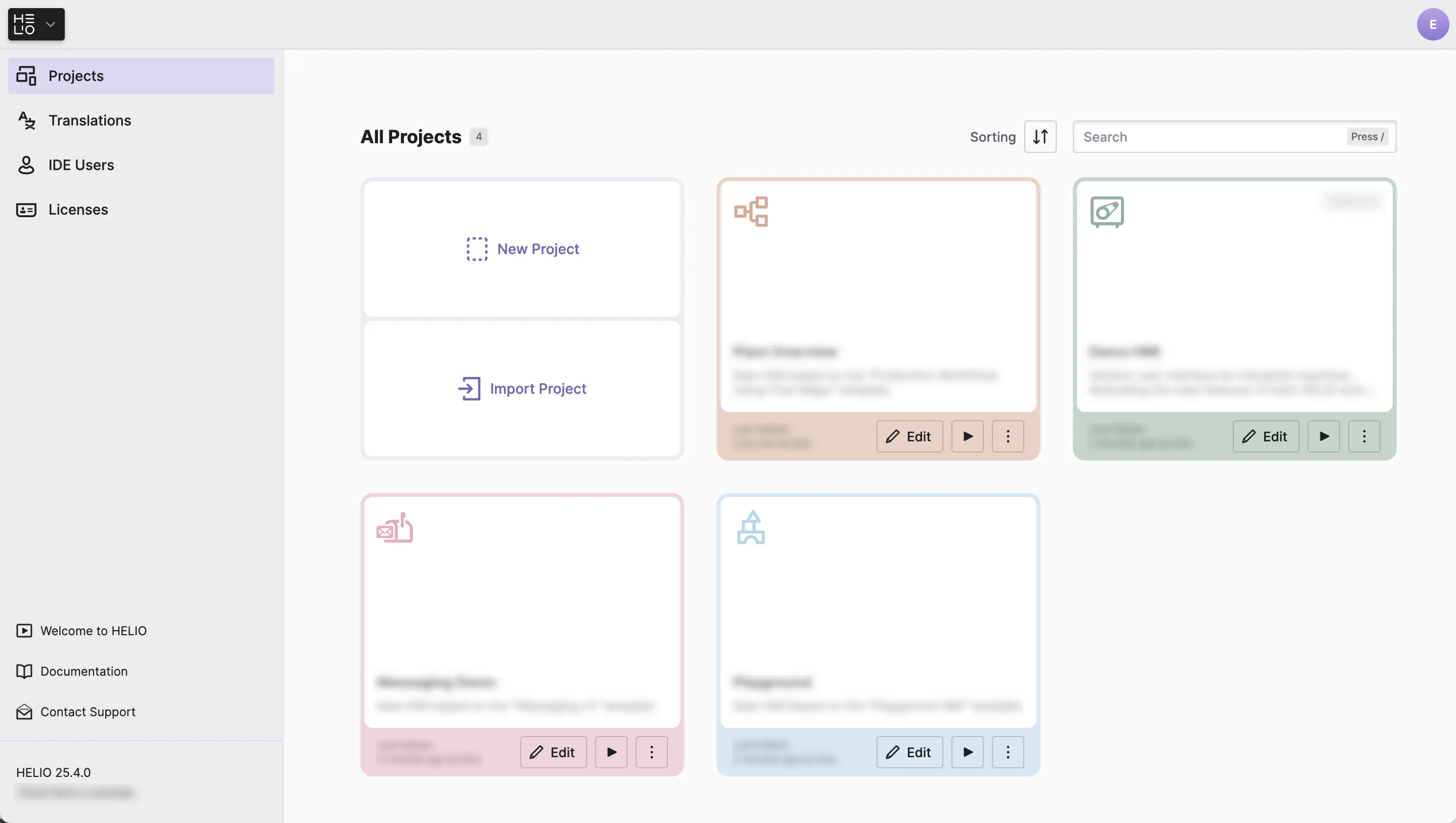
- You can now quickly switch between Projects, Translations, IDE Users.
- Documentation, support, and getting-started resources are no longer buried. They're right there in the Home Page sidebar, with the prominence they deserve.
A Refreshed Project Editor
The Project Editor has been tuned for clarity, efficiency and growth.
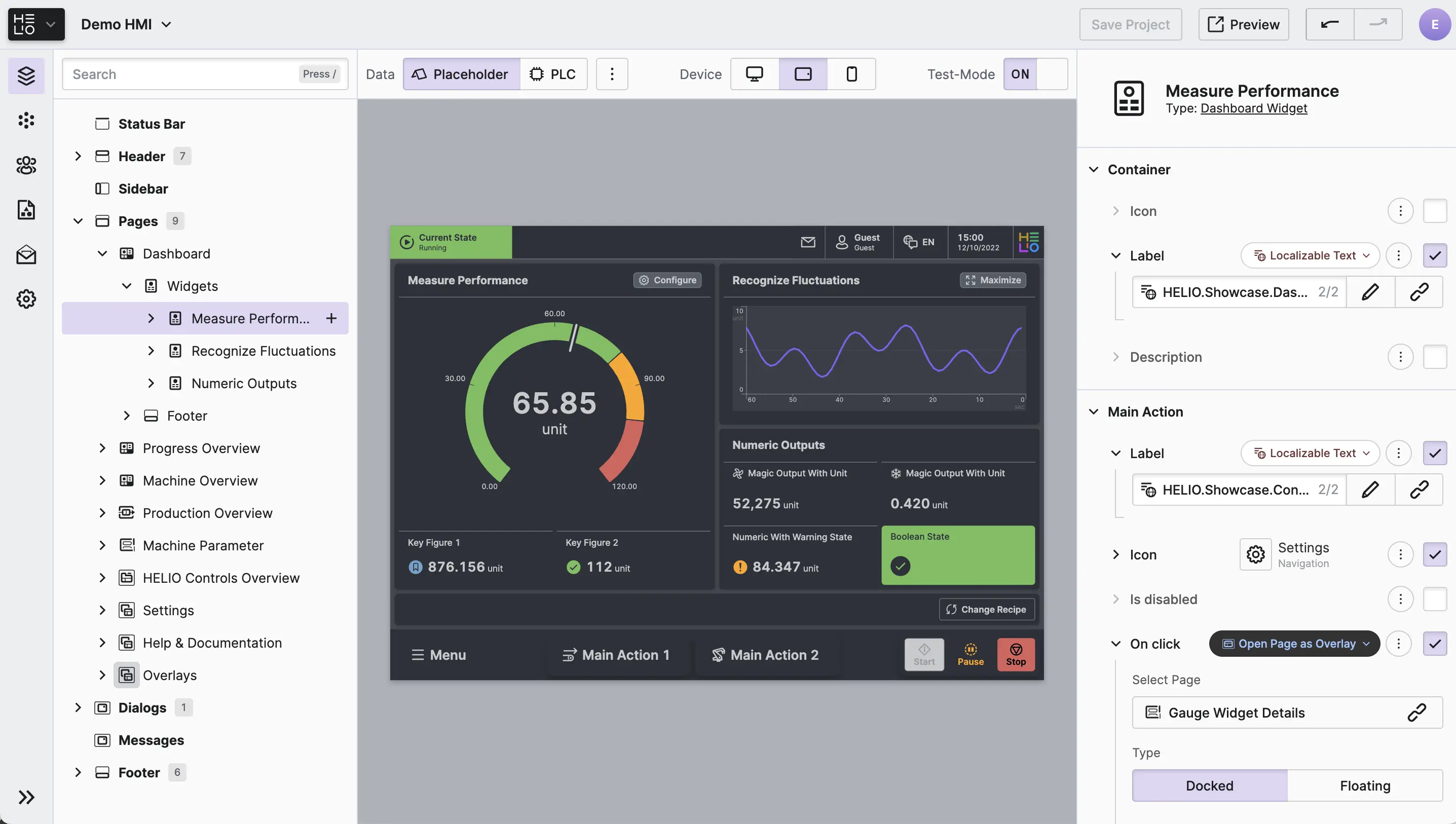
We've introduced a new sidebar to switch between the editor's views. In contrast to the previous tab navigation, it can grow sustainably as we add new capabilities – without cluttering your workspace.
Many quality of life improvements have been made, e.g. we changed
the Test-Mode from a Button-Bar to a simple Switch. Toggling the mode
is now much easier since it requires no mouse movement at all!
Meet the New HELIO IDE Menu
We love this one because it solves challenges we saw in our usability tests. Especially new customers were having a hard time navigating the IDE. That's why we introduced the HELIO IDE Menu with a clear button design to make the most important navigational features easier to access.
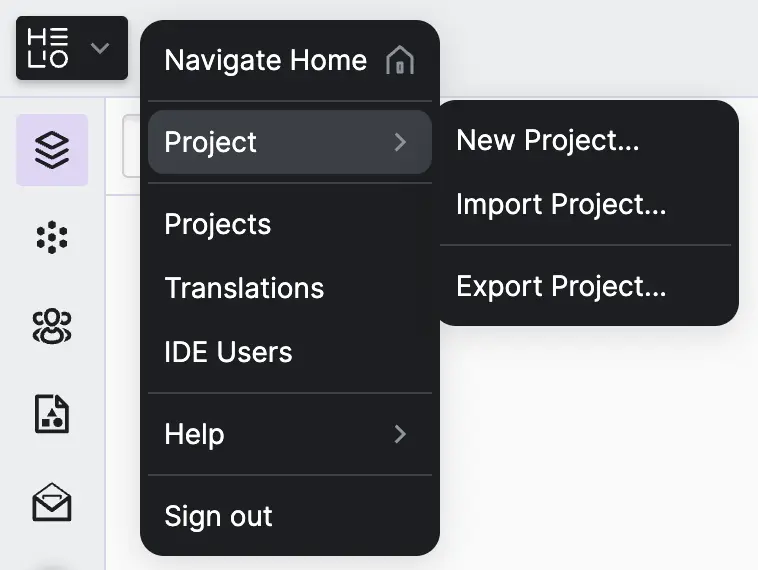
Finding your way back home or to other views has never been easier.
Rulers for Live Trends - Pause and Inspect
This is another long awaited feature from the HELIO community: the Trend element is now able to be analyzed. Tap any trend line to pause the data and bring up an interactive ruler that reveals exact values at that moment in time.
Visualizing more than one trend? The ruler automatically aligns across all visible trends, letting you compare values and spot correlations instantly.
Sankey Diagrams - Make Every Flow Visible, Every Loss Obvious
Understanding where energy goes or how production flows through your facility shouldn't require mental gymnastics. Sankey diagrams transform complex flow data into intuitive visual representations where the width of each path shows you exactly how much is moving - and where. The new Sankey Diagram Page and Sankey Diagram let you build powerful flow visualizations directly into your HMI.
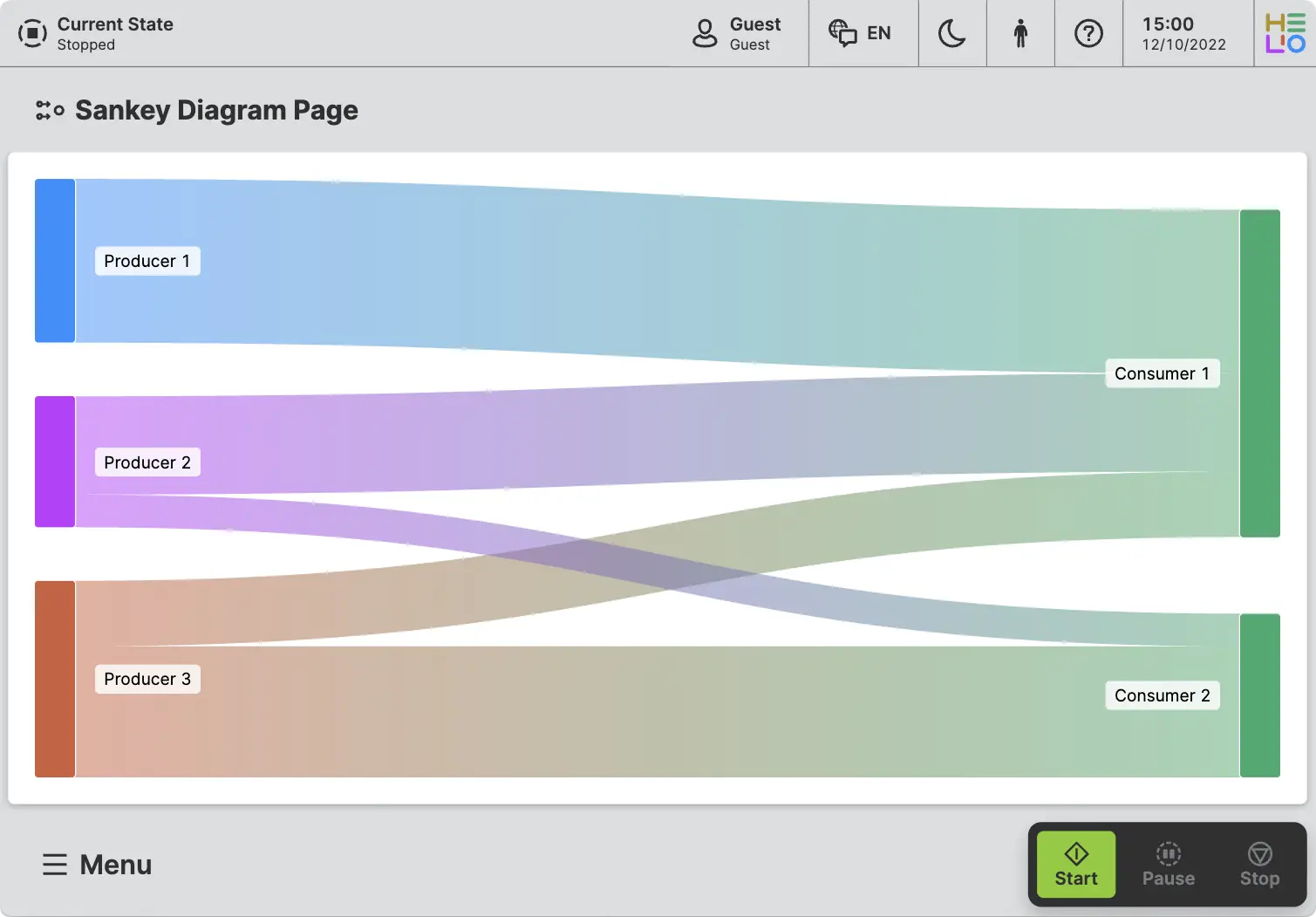
Map energy distribution across your machine or facility, track material flows through production lines, or visualize any process where understanding proportional flow matters. Give operators and engineers the clarity they need to optimize processes and reduce waste.
Personalization v1 – HMIs That Adapt to People
Industrial environments are as diverse as the people who work in them. Operators bring different experiences, preferences, and needs to their daily work. HMIs are expanding to new contexts too – from small tablets on the factory floor to large TV screens monitoring entire production lines. In the past, everyone got the same interface and experience. Same text sizes. Same contrast. Same colors. One size fits nobody.
We're changing that with Personalization – a new system that lets HMIs adapt
to each operator's needs. This isn't just about convenience. It's about
accessibility, efficiency, and creating interfaces that work for everyone.
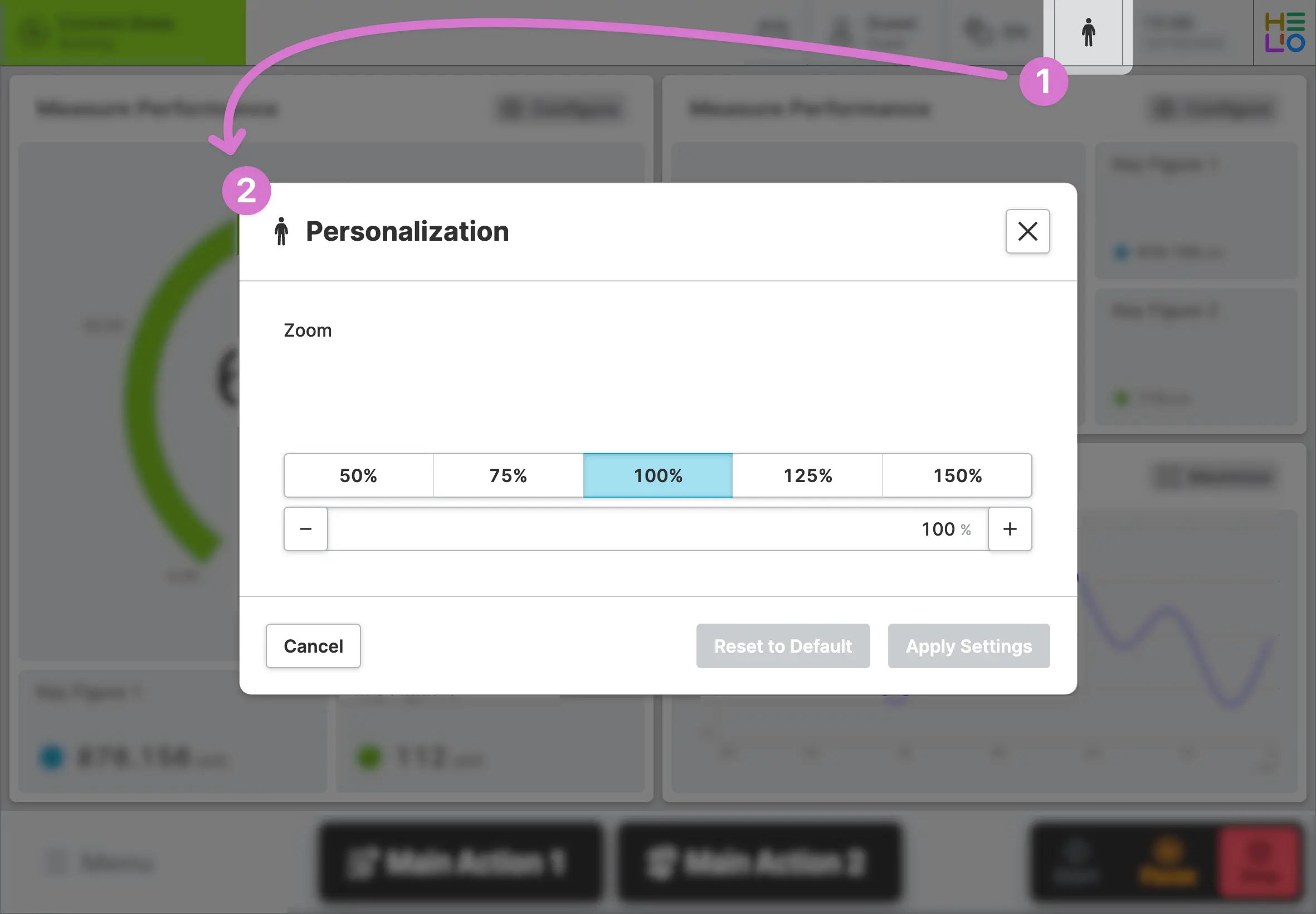
HELIO 25.4.0 introduces a dedicated Personalization dialog where operators can
adjust their settings. And we've made integration simple: a new built-in
Personalization
Header Cell launches the dialog with a single
click. Add it to your HMI header, and operators have instant access to their
personalization options – no custom actions or navigation needed.
Starting With Zoom: This first version launches with Zoom to take control of text sizing. Operators can adjust the zoom across the HMI to match their readability preferences – whether they need larger text or want to fit more information on screen. Settings persist across sessions and devices, so configure once and you're done.
What's Next? This is just the foundation – we're planning more accessibility and personalization features that will all be available in the same dialog. These include a high-contrast mode for operators working in bright environments or with visual impairments.
This is a long-term investment in making HMIs work better for everyone. As always, we're listening – if there are specific accessibility or personalization features your operators need, let us know.
Learn more with the following resources:
- Adjust the Personalization Defaults using the General Settings
- Use the Show Dialog Action to show HELIO's built-in Personalization dialog
Changelog
New Features
SDK
- HELIO SDK is now publicly available
Design System
New Pages
HELIO-1390 "Sankey Page"
New Elements
HELIO-1390 "Sankey" element
HELIO-1793 "Dual Axis" element
Trend
HELIO-1613 Added the ability to pause and inspect live trends using a ruler
HMI
HELIO-1303 Introduced "Personalization" dialog and Header Cell
Improvements
Runtime
HELIO-1917 Support graceful shutdown via SIGTERM and Ctrl+C/SIGKILL
Data Layer
HELIO-1913 Added support for Data Variable Type "JSON"
- Added support for reading and writing of OPC UA Data Type "LocalizedText"
HMI
HELIO-1793Added ability to add Axis directly to Dashboard Page
HELIO-1794 Improved theming support for
Flow Map PageDesign System
HELIO-1882 Introduced "Linear Flow Page"
Flow Map
HELIO-1882 Added "Text Alignment" property to "Flow Map Module"
HELIO-1935 Added ability to disable a "Flow Map Module"
IDE
IDE Refresh
HELIO-1941 Introduced "Welcome to HELIO" link to Home Page in order to improve onboarding experience
HELIO-1767 Moved "Style View" into Style: Look & Feel and removed component overview
HELIO-1817 Added documentation links for all elements
General
HELIO-1847 Harmonized error display on input fields
HELIO-1843 Improved support for multiline text in "New Translation" dialog
Content View
HELIO-1847 Added "Instance ID" to tooltip in HMI Content Tree
HELIO-1853 Disabled option to deactivate autoplay for HLS video streams
HELIO-1820 Disabled sizing options for buttons without text
HELIO-1820 Added "Page Section Conditions" for "Tab Group"
HELIO-2020 It is no longer possible to create auto-dismissing error toasts
- Elements in the "HMI Content Tree" can now also be renamed when using the "Static Value" dynamic property
Data View
HELIO-1730 Removed unit input for data types without units
HELIO-1730 When copying and pasting the properties of HMI data nodes, the recipe group is now also taken into account
Messaging View
HELIO-1895 Made size of "Code" column adjustable
Fixed
Runtime
HELIO-1960Stopped repeatedly recording last-seen trend value when connection is lost
Data Layer
OPC UA Connection
- Fixed reading/writing of ByteString values
NOA Connection
HELIO-1985 Increased timeout for refreshing the data tree from 30 to 120 seconds
HMI
HELIO-1806 Fixed On-screen Keyboard closing on "Floating Page Overlays"
HELIO-1904 Fixed issue where messages would get stuck in the active state when the trigger was deleted
HELIO-1750 Fixed unresponsive inputs on "Image Page with Panels"
HELIO-1995 Fixed "Import List Items from CSV File" action when using with comma ',' as delimiter
HELIO-1997 Fixed "Export List Items as CSV File" action
HELIO-2013 Normalize durations before formatting to improve # readability
HELIO-1789 Fixed "Page Group" in overlay displaying incorrect page title
HELIO-1972 Children of a "Tab Group" are now hidden from Main Navigation, just as children of a "Page Group" with embedded navigation are
HELIO-2014 The "Tab Group" page header styling was fixed when no title is displayed
IDE
HELIO-1803 Fixed issues when importing projects that contain asset file names containing characters such as spaces
HELIO-1650 Fixed usage of ALT key shortcuts (e.g. ALT+5) in input fields
HELIO-1650 Prevented drawer from being stuck when navigating to another IDE view
HELIO-1695 Fixed minor issues when deleting IDE users
HELIO-1814 Fixed reload button in license limit banner
HELIO-1863 Improved feedback for "Unit Switch" when no units are configured
Icons
45 icons have been added to the HELIO Icon Set, bringing the total to a
whopping 1186. 🎉
Added
AngleMeasureAnnealingArrowDownXArrowDownYArrowDownZArrowLeftXArrowLeftYArrowLeftZArrowRightXArrowRightYArrowRightZArrowUpXArrowUpYArrowUpZAtomBottomCenterBottomLeftBottomRightBusinessCardCakeCakeSliceCapsuleCenterCenterCenterLeftCenterRightCherryCrystalBallCurlyBracketsFriesJumpSuitLoginLogoutPieChartSlicePieRadianArcReceiptRopeSnakeSorterStickerTapeTopCenterTopLeftTopRightVirus